
Add-ons (reference)
A phone call is a handset with a microphone and a speaker. Anyone could wire a computer to a handset and put a program on the line. An add-on makes that a supported, optional part of your account: any service that serves live voice (an assistant you think out loud with, a radio station, a notes taker, a doorbell) gets an address on your account and joins calls like a phone does.
Add-ons are not part of the default phone. A server offers them only if its operator turns them on, and a person uses one only by linking it to their own account. Nothing in Open Lounge Phone knows any particular add-on: each one says what it does, and the server holds it to the parts it can check. Every add-on is treated as untrusted code; the rules are in security-model.md.
What an add-on is
Section titled “What an add-on is”- An endpoint on your account. Linking one gives it an address that is part of your account,
such as
jesse+radio@hub.example. Nothing separate to sign up for or manage. Removing it from your account revokes it at once. - Yours alone, unless it offers a part to share. Only you can call it at its address, and without naming a share it calls only you. An add-on may offer parts of itself for sharing (one shared project, one station); you give such a part to specific people, and they reach that part, and only it, at its own address (Sharing). Nobody can knock on an add-on, it never appears in a directory, and kids’ phones can’t reach one.
- Told who’s speaking. Every call tells the add-on the verified caller: their address and name, checked by their server. It can greet people by name and keep separate memories per person. The app says so before you call it or give someone one of its shares.
- It says what it does. Whether it can be called, whether it calls you, whether it offers shares, whether it reacts to keys, how many calls it takes at once, and what it does with what it hears (Saying what it does). Its page in the app shows this in plain words.
- Always marked as an add-on. Apps show its name with an “add-on” badge; phones show
RADIO · ADD-ON(the hardware phone’s font writesRADIO - ADD-ON), and a call within a share shows the share withADD-ON CALLINGbelow it. Whatever its name or its shares’ labels, it never shows as a person, a phone or the phone’s own words.
Turning add-ons on (operators)
Section titled “Turning add-ons on (operators)”Off by default. Self-hosted: ADDONS=on (self-hosting.md). Cloudflare:
scripts/deploy.ts --addons or npx openloungephone deploy cloudflare --addons
(cloudflare.md); every deploy sets it, so leaving the flag out turns them off.
While add-ons are off, nobody can link one (“This server doesn’t offer add-ons. Its operator can
turn them on.”), add-ons linked earlier can’t connect or be called (the app says so), and the
server doesn’t list the addons, addon-shares and addon-leave features, so other servers
never offer it add-on calls or share grants.
Using one: the Add-ons tab
Section titled “Using one: the Add-ons tab”The companion app has an Add-ons tab when the server offers add-ons (or you have some, or someone shared one with you).

- Link. Start linking in the add-on: it asks for your server’s address and shows a 6-digit
code. In the app, Add-ons → Link an add-on, type the code and choose its name (the part
after
+: 2 to 30 letters, digits, dots, dashes or underscores). It’s linked in the space you’re in. - Put it on a key. Right after linking, its page opens with Put on a key ready: your own phone and its first free key are chosen, so Put on key 1 is one tap. Lift the handset, press the key. (From link to talking: 8 steps.) You can choose another phone or key, and change the key’s label; a key that already calls someone says so first. Kids’ phones never take add-ons and aren’t offered.
- Call it from its page (Call), or Add to contacts: it then shows on Home with a Call button.
- It calls you, if it says it may, for a check-in it planned, say. It rings wherever you can be rung: your apps, your own phones, a Lounge phone you’re signed in at.
- Its page shows whether it’s online now (as the server reports it), its address with Copy, where it’s linked (“Linked to Jesse (jesse@hub.example), in Jesse’s home, on hub.example”), What it does, its Shares (each with Call, Add to contacts, Put on a key and Give to…), Ask it for a new share… when it offers shares, Test connection (below), and Remove: it’s cut off at once, told to forget its link, and every share of it goes; the question names the shares and how many people lose them. With one add-on and nothing shared with you, the tab opens straight on its page.
- Nothing goes silently. When an add-on is removed (by you, or because you left the space or the space went), the Add-ons tab keeps a note of it until you press OK: which shares went and who no longer has them. Someone holding a share sees it under Shared with you when it stops working or goes, with why (Holding a share), on their own server.
- Accounts on two servers. An add-on shows on the app of the server it’s linked to. To reach it from your account on another server, connect your two accounts (Connections), then on the add-on’s server give that account a share of it.
When a call doesn’t go through, the app and the phones say why: the add-on isn’t connected
right now (ADD-ON OFFLINE), it takes no calls, it’s on as many calls as it takes, add-ons are
off on that server, you’re already on a call, or, for your own address, that no add-on of that
name is linked to your account on that server (NO SUCH ADD-ON: it may be linked on your other
server). Anyone who may not call an address hears only “You can’t call that address”, whether
anything is there or not.
A call with an add-on is one to one: no Add caller, no Transfer. The app shows a Keypad during the call when it takes keys; it hears the keys (“press 1 to…”). Calls to and from an add-on don’t go to voicemail.
Fair use: an add-on’s call minutes count against its owner’s allowance, whoever placed the call (hub.md). Audit: linking, granting and revoking shares, a holder giving one back, share requests and their results (made, refused, offline, no answer), limits reached and removing it go in the space’s audit trail (names, ids and counts, never content).
Sharing
Section titled “Sharing”An add-on is personal by default: only its owner can call it at its address. Sharing is something the add-on defines: it says which parts of itself can be shared. Open Lounge Phone decides who gets each part and enforces it. A private assistant can’t be opened up to several people as a whole; only the pieces it offers can be shared.
Each share has its own address: handle+name+share@host, e.g.
jesse+radio+listen@hub.example. The plain add-on address stays its owner’s alone; its owner may
also call within any share (the add-on is told grantId owner).
Giving a share. On the add-on’s page, Give to… on a share, then choose one of your
connections (here or on servers that list addon-shares) or someone in your spaces. Before you
give it, the app says that the add-on will learn their name and address when they call, and can
hear what they say. The server keeps the grant (by the person’s server and stable account id)
and refuses any call to the share’s address from someone without one, with unavailable like
every refusal. A grant also stops working when that person is no longer your connection (or,
here, in one of your spaces). Revoke takes it back and ends their calls into it at once.
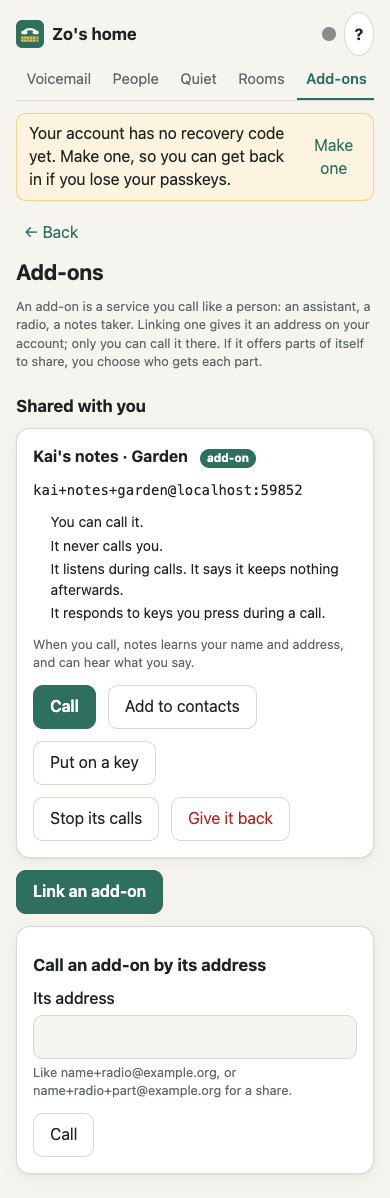
Holding a share. Under Add-ons → Shared with you, each share given to you shows what the add-on said it does (for one on your own server), that it learns your name and address when you call and can hear what you say, and:
- Call, Add to contacts, Put on a key (your own phones, never a kids’ phone).
- Stop its calls: the add-on can’t call you any more (you can still call it). Your own server enforces this, so it holds whatever the add-on’s server does. Let it call me undoes it.
- Test connection: checks it end to end without a call (below).
- Give it back: you lose the share and your calls within it end; its owner sees you gone.
Across servers this uses
POST /fed/v1/addon-shares/leave(featureaddon-leave); your server forgets the share at once either way and refuses the add-on’s calls to you within it.
When a share stops working, it stays on the list, marked with why, until you give it back:
| Shown | Why |
|---|---|
| Stopped: add-ons are off on this server / on that server | the operator turned add-ons off (here, or on the add-on’s server) |
| Stopped: Jesse’s account is suspended | its owner’s account is suspended on its server |
| Stopped: you’re no longer connected with Jesse | you disconnected or blocked each other, or (here) you left the spaces you shared |
| Gone: Jesse removed the add-on / took it back | its owner removed it, or took the share back |
| Gone: the add-on doesn’t offer it any more | the add-on stopped offering that share |
| Gone: Jesse’s server doesn’t list it any more | another server’s list of your shares no longer has it |
A stopped share can’t be called, put on a key or tested; Give it back removes it (for one that went, it just takes it off your list).
What the add-on is told. A call that came in through a share carries it:
← {"t":"call.ringing","callId":"call_…","from":{"label":"Ana","address":"ana@other.example"}, "share":{"id":"listen","label":"Listen","grantId":"ag_…"}}- No
share: its owner is calling its own address.grantIdowner: its owner within a share. grantIdnames the grant, so the add-on can attribute what happens to it.- The add-on must keep the conversation inside that scope. The server can’t see inside the add-on, so this part is the add-on’s job, best enforced by its own permissions (a token limited to that one scope), not only by instructions to a model. The server’s job is that nobody without a grant gets in.
Ask it for a new share… On its page (a name, people) sends:
← {"t":"addon.share.request","requestId":"sr_…","label":"Garden","by":"jesse@hub.example", "with":["ana@hub.example","bob@other.example"]}- The add-on makes the scope, sends its updated
addon.shares(with the new share), then answers→ {"t":"addon.share.created","requestId":"sr_…","id":"garden"}. The server then gives the share to the people inwith; the owner started it, so no second confirmation is needed. - Or
→ {"t":"addon.share.refused","requestId":"sr_…","reason":"…"}(shown to its owner). - The app shows where it stands: waiting, done, refused with the reason, “offline” (it wasn’t
connected, so it wasn’t asked) or “didn’t answer” (no answer within a minute; a late answer is
turned down with an
error).
Calling out within a share. → {"t":"call.address","address":"ana@other.example","share":"listen"}:
the add-on may call its owner, or a person who holds that share and hasn’t stopped its calls. The
callee sees call.ringing.from {"label":"radio","address":"jesse+radio+listen@hub.example", "kind":"addon","share":"Listen"}. Without share it may call only its owner.
Who sees what. The owner: the add-on’s page lists its shares and who holds each. A holder on
the same server: Add-ons → Shared with you. Holders on another server: their server is told
(POST /fed/v1/addon-shares, feature addon-shares) and shows it under Add-ons and on that
connection. Nobody else, in the owner’s household or anywhere, sees a private add-on or its
shares.
Building one
Section titled “Building one”The easy way is the add-on bridge (sdk/python, Python 3.10+, Apache-2.0, so any service can use it; the rest of Open Lounge Phone is AGPL). It does the linking, the key and the signed challenge, reconnects, and turns calls into events and plain PCM:
import asynciofrom olp_addon import Addon
addon = Addon("https://hub.example", "echo.addon-key")   # its Ed25519 key, made on first useaddon.set_about(summary="Plays back what you say.", hears="live", keys=True)
@addon.on_callasync def talk(call):    print("call from", call.caller.name, call.caller.address)   # verified by the server    call.on_key = lambda key: print("pressed", key)    await call.answer()    async for frame in call.frames():   # 20 ms of 16-bit mono PCM, 48 kHz by default        await call.send(frame)           # here: an echo; in a real add-on, its voice
asyncio.run(addon.run())   # prints the link code the first time, then takes calls
Addon(server_url, key_path, *, rate=48000, about=None): the key file is made with mode 600; the link is kept next to it (<key_path>.json).rateis the PCM rate both ways.addon.set_about(hears, *, summary, transcribes, answers, calls, shares, keys, lines): what it does (below); sent after every connection.await addon.link(on_code=print): shows the code (on_code(code, expires_at)also gets when it stops working), waits for its owner, saves the link.addon.onlineand@addon.on_status: whether it’s connected now, and a handler for changes.@addon.on_call: gets each ringingCall(several at once, if it saidlines).await addon.run()(orstart()/stop()) stays connected; it raisesAddonRemovedwhen its owner removes it.await addon.call(address, share=None) -> Call: calls its owner, or withsharesomeone holding that share (call.stateisringing, orendedwithcall.reason).addon.set_shares([{"id": …, "label": …}]),call.share,@addon.on_share_request: see Sharing.@addon.on_test: an optional check before it answers a Test connection.Call:.caller(.address,.name),.share,.callee,.state,.reason,await answer(),await hangup(),frames(),await send(pcm),clear(),on_key,on_hangup,await wait_active(),await wait_ended().- Audio is converted for you: apps send Opus, hardware phones PCMU; the bridge resamples.
The examples: examples/echo.py plays back what it hears half a second later (# hangs up);
examples/radio.py is one-way: it plays a tune to several callers at once and never reads what
they say. End-to-end tests link them through the companion in a browser and call them with real
audio (tests/e2e/live/addon.test.ts, tests/e2e/live/addonTab.test.ts, opt-in).
Saying what it does
Section titled “Saying what it does”After connecting (before addon.shares), an add-on says what it does:
→ {"t":"addon.about","summary":"Plays the station.","hears":"nothing","transcribes":false, "answers":true,"calls":false,"shares":true,"keys":false,"lines":10}| Field | Meaning | Enforced by the server |
|---|---|---|
summary |
One plain sentence, up to 140 characters | shown as its words (plain text only) |
hears |
nothing: it only plays sound (one-way); live: listens, keeps nothing; keeps: keeps recordings, transcripts or notes |
shown as its words |
transcribes |
It turns what it hears into text | shown as its words |
answers |
People can call it (default true) | yes: otherwise every call to it is unavailable |
calls |
It may call people (default false) | yes: otherwise its call.address is refused |
shares |
It offers parts to share (default false) | yes: otherwise addon.shares with any share is refused, and earlier shares go |
keys |
It reacts to keys (default false) | yes: otherwise no call.key reaches it, and apps show no keypad |
lines |
Calls it takes at once, 1–100 (default 1) | yes, capped at the server’s limit (10); more callers hear busy |
It replaces what it said before. An add-on that never sends it keeps these rules: it can be
called, may call, may offer shares, gets keys, one call at a time; its page says it hasn’t said
what it does. Servers list the device feature addon-about; the bridge sends it only to them.
Test connection
Section titled “Test connection”Test connection on an add-on’s page (its owner), or on a share under Shared with you (a holder, here or on another server), checks an add-on end to end without placing a call. The server sends it a small message, and the add-on answers at once:
← {"t":"addon.test","testId":"at_…"}→ {"t":"addon.test.ok","testId":"at_…","version":"seat/1.4","uptimeS":10800,"calls":0}The app says how it went: “Answered in 42 ms · seat/1.4 · up 3 hours”, “Not connected.”, or
“Connected but didn’t answer in 5 s.” (A holder who can’t reach it now gets “You can’t reach it
now.”, whatever the reason.) version, uptimeS (seconds since it started) and calls (calls
it’s on) are optional and plain text; a late answer, or one for another add-on’s test, is ignored.
The bridge answers by itself; @addon.on_test can run a check of its own first and, by raising,
not answer. Each person may test one add-on 30 times an hour.
The protocol, for other languages
Section titled “The protocol, for other languages”An add-on speaks the device protocol of a phone (protocol.md) over
wss://<server>/ws/device (?device=<id> once linked). Its address is handle+name@host:
handle is its owner’s current handle (it follows a handle change), name the part after +,
host the server (with a port if it has one).
Linking:
→ {"t":"hello","proto":1,"model":"addon","fw":"my-addon/1.0","buttons":1,"display":"none"}→ {"t":"pair.begin","kind":"addon","alg":"ed25519","publicKey":"<raw 32-byte key, base64url>"}← {"t":"pair.code","code":"123456","expiresAt":1790000000000}← {"t":"pair.done","deviceId":"ao_…","householdId":"hh_…"}Every connection after that (/ws/device?device=ao_…):
→ {"t":"hello","proto":1,"model":"addon","fw":"my-addon/1.0","buttons":1,"display":"none","deviceId":"ao_…"}← {"t":"auth.challenge","nonce":"<32 bytes, base64url>"}→ {"t":"auth.proof","sig":"<Ed25519 signature over the raw nonce bytes, base64url>"}← {"t":"config","buttons":[],"quiet":false,"now":1790000000000,"server":{…,"features":[…,"addons","addon-about"]}, "addon":{"name":"radio","address":"jesse+radio@hub.example", "owner":{"name":"Jesse","address":"jesse@hub.example"}}}→ {"t":"addon.about",…} → {"t":"addon.shares",…}A call to it:
← {"t":"call.ringing","callId":"call_…","from":{"label":"Bob","address":"bob@other.example"}}→ {"t":"call.answer","callId":"call_…"}← {"t":"rtc.config","callId":"call_…","iceServers":[…]}← {"t":"call.state","callId":"call_…","state":"connecting"}← {"t":"rtc.sdp","callId":"call_…","type":"offer","sdp":"…"} the caller offers→ {"t":"rtc.sdp","callId":"call_…","type":"answer","sdp":"…"}↔ {"t":"rtc.ice","callId":"call_…","candidate":"candidate:…","sdpMid":"0","sdpMLineIndex":0}← {"t":"call.state","callId":"call_…","state":"active"}← {"t":"call.key","callId":"call_…","key":"5"} a key on the app's keypad→ {"t":"call.hangup","callId":"call_…"} or ← {"t":"call.state",…,"state":"ended","reason":"hangup"}A call from it (people only: its owner, or, naming a share, someone who holds it; by address):
→ {"t":"call.address","address":"jesse@hub.example"}← {"t":"call.state","callId":"call_…","state":"ringing"} or "ended" with a reason← {"t":"rtc.config",…} ← {"t":"call.state",…,"state":"connecting"} once answered→ {"t":"rtc.sdp","callId":"call_…","type":"offer","sdp":"…"} it places the call: it offers← {"t":"rtc.sdp","callId":"call_…","type":"answer","sdp":"…"}Other rules:
{"t":"ping"}→{"t":"pong"}keeps the socket open (every 25 s or so).- Once signed in, an add-on may send only
ping,addon.about,addon.shares,addon.share.created,addon.share.refused,addon.test.ok,call.address,call.answer,call.hangup,rtc.sdpandrtc.ice(withoutpeer). Anything else is answered with{"t":"error","code":"bad_message","message":"not for add-ons: …"}and does nothing. - Words people will read (share labels,
summary, a refusal’sreason, itsfw) are plain text: control, format (such as right-to-left overrides), private-use and line-break characters are refused with anerror. - It takes
linescalls at once (default 1; each answered call goes on beside the others) and places one call at a time. Every refusal of a call to or from it — unknown, not allowed, add-ons off, its owner suspended — endsunavailable(ordeniedwith anote, for fair use and the limits below). - Removed by its owner (or its owner left the space it was linked in), it gets
{"t":"wipe","reason":"removed"}and the socket closes; it should forget its id. Its owner suspended:{"t":"error","code":"unauthorized",…}and it can’t connect until that’s lifted. With add-ons off, the server answers itshelloorpair.beginwith{"t":"error","code":"unauthorized","message":"This server doesn't offer add-ons. Its operator can turn them on."}and closes.
Limits
Section titled “Limits”Every limit is in packages/server-app/src/limits.ts (operators can change them).
| Limit | Default | Over it |
|---|---|---|
Calls one add-on takes at once (addon.about.lines asks for up to this) |
10 | busy |
| Longest call with an add-on | 4 hours | the call ends (“Calls with add-ons end after a few hours.”) |
| Calls one add-on places per hour | 10 | denied + note; audited once |
| Calls one add-on places to one person per day | 6 | denied + note; audited once |
| Calls one person places to one add-on per hour | 30 | denied + note |
Share lists (addon.shares) per hour |
60 | error rate_limited, list unchanged |
| Test connection, per person and add-on per hour | 30 | 429 “Too many tests of this add-on. Try again later.” |
| Connections (signed in) per hour | 120 | error rate_limited, closed (4429) |
| Messages per minute on one connection | 600 | error rate_limited, closed (4429), its calls end |
TURN credentials for a call with an add-on are made only once it’s answered, last no longer than the longest call, and on Cloudflare are revoked when it ends.
Across servers
Section titled “Across servers”Calls to and from add-ons on other servers use the federation feature addons
(federation-spec.md): the addon call target
({"kind":"addon","handle":"jesse","name":"radio"}) and, for a call from an add-on,
CallBody.addon (its name; from is its owner and to must be a person). Shares add the feature
addon-shares: the target’s share, CallBody.addonShare (for a call from an add-on within a
share) and POST /fed/v1/addon-shares (the shares a person there holds, for their server to
list). addon-leave adds POST /fed/v1/addon-shares/leave (a holder there gives one back).
POST /fed/v1/addons/test is a holder there’s Test connection: the add-on’s server checks the
grant (anyone else gets unavailable), asks the add-on and answers how it went.
The add-on’s server decides every call into it by its own grants. The holder’s server decides
calls from it: it rings a person only within a share that the add-on’s server told it they hold,
with the label it was told, and never once they stopped its calls. A call through a kids’ phone
or a guest is refused; a server that doesn’t list addons is never offered add-on calls (“That
server doesn’t take add-on calls”), and one that doesn’t list addon-shares can’t receive grants
or calls into shares (“That server doesn’t take shared add-ons yet”). Keys travel as call.key
on the server-pair stream.
The app’s side (HTTP)
Section titled “The app’s side (HTTP)”GET /api/addons: yours, withonlineas the server sees it,about(what it said, or null),rules(what the server lets it do),shares(id,label,address,holderswithgrantId,name,address),allowNote, and whether the server offers add-ons.POST /api/addons/link {code, name}.DELETE /api/addons/:id.GET /api/addons/people: who you can give a share to (refconn:<id>oruser:<id>,name,address,where).POST /api/addons/:id/shares/:share/grants {to: ref}→{grantId, name, address};DELETE /api/addons/:id/grants/:grantId.POST /api/addons/:id/share-requests {label, with: [ref]}andGET /api/addons/:id/share-requests/:requestId→{id, label, state, shareId?, reason?, people},stateone ofwaiting,created,refused,offline,timeout.GET /api/addons/gone: notes of your add-ons that were removed (whatremoved, withshares[{label, holders}]), newest first, at most 20;DELETE /api/addons/gone/:iddismisses one. Each add-on inGET /api/addonsalso saysowner(name,address) andserver.GET /api/addons/shared: every share of someone else’s add-on you hold, here or on a connection’s server:key,here,owner,addon,share,address,muted,about(add-ons here), andstoppedwhen it doesn’t work (addons_off_here,addons_off_there,suspended,not_connected) or went (removed,taken_back,not_offered,not_connected,gone; then withgoneId, its note, whichDELETE /api/addons/gone/:idremoves). Working shares from other servers also come with that connection inGET /api/connections(addonShares).POST /api/addons/:id/test(its owner) andPOST /api/addons/test {address}(a share you hold): Test connection,{state: ok|offline|timeout|unavailable, ms?, version?, uptimeS?, calls?}.PUT /api/addons/muted {address, muted}: stop (or allow again) an add-on’s calls to you.POST /api/addons/leave {address}: give a share back (working or stopped).GET /api/addons/contacts,PUT /api/addons/contacts {address, label?},DELETE /api/addons/contacts {address}: add-ons (and shares) you may call, in your contacts on Home (ok: you can call it now).PUT /api/devices/:id/lines {address, label, key?}: put an add-on’s (or share’s) address on one of your own phones, on keykeyin the same step. Phones learn which keys call add-ons (config.buttons[].addon) and show them as such while calling.- Apps call an add-on or a share with
call.addressand send keys withcall.key.
Examples
Section titled “Examples”- An assistant you think out loud with. It says
hears: "keeps"andtranscribes: true, so its page tells you it keeps what it hears. It offers each shared project as a share; someone you give one to calls that project’s address, and it works only inside it. - A radio. It says
hears: "nothing",lines: 10,calls: false, and offers one share, “Listen”, that its owner gives to a few people. They put it on a key; it never calls them, and its page says so. - A doorbell or a reminder. It says
answers: falseandcalls: true: it can only call its owner (or holders within a share), a few times a day at most.
Not built yet
Section titled “Not built yet”- Shares that carry actions too (the add-on declares them, e.g. “add a task”, and the app shows them as buttons; the add-on does the work).
- Add-ons that receive voicemail or send notices.
- Keys from hardware phones during a call (today only the apps’ keypad sends them).
- The hardware phone shows the add-on’s name with
ADD-ONfor a call within a share, without the share’s label.